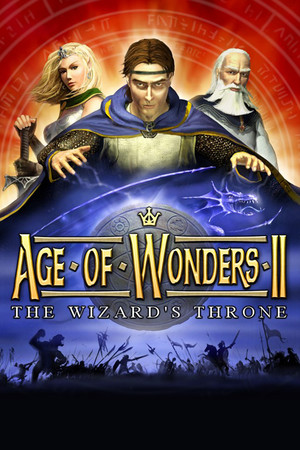
Age of Wonders II: The Wizard’s Throne
Does Age of Wonders II: The Wizard’s Throne run on Windows 11, Apple Silicon Macs, Linux and Steam Deck?
Runs with a fix. See the steps below.1
No Mac version is sold.
Through Proton. ProtonDB: Gold, runs perfectly after tweaks.3
Unsupported, as rated by Valve.1
One click, no account, so the next player knows. How we check where it runs
How to get Age of Wonders II: The Wizard’s Throne running today
- Set aow2.exe, aow2compat.exe and aow2setup.exe to Windows XP (SP3) compatibility mode, disable fullscreen optimizations and run as administrator, as described in this Steam Community guide.
- Run aow2setup.exe after that change to unlock modern resolutions such as 1920×1080, and leave the in-game Resolution Switches option off (Steam Community).
- Avoid Alt+Tab in fullscreen, since it can leave a black screen that forces a hard exit (PCGamingWiki).
Synopsis
Age of Wonders II is a turn-based fantasy strategy game in which players lead a wizard who builds an empire of cities, researches spells and sends armies of heroes and creatures across a hex map. Battles can be fought out on a separate tactical screen. A story campaign links a series of scenarios, and stand-alone scenarios support hot seat, LAN and play by email.
- Developer
- Triumph Studios
- Released
- 2002
- Genre
- RPG, Strategy
- Where to get it
- Steam
Reception
Critics at release praised its depth, spell system, races and strong pull of one more turn, though some found the AI weak in sieges and city building and the interface short on key unit information. The early campaign was also called punishing, with a tutorial that covers only the basics. Players today still rate it highly as a classic and often prefer it to later entries. The common complaints now are that it can feel awkward and hard to understand, and that it takes setup to run well on modern Windows.
 Trailer from Steam
Playability today
The average of two parts, each from 1 to 5. Tap a check to see why. How it works
Runs today
3/5- Sold or given away today by an official source
- Needs fan patches to run well on Windows 11
- ?Not confirmed yetSingle-player works without an internet connectionNo source covers the current version yet, so this check counts as open, not passed. Played it lately? Tell us
- Some content no longer works (servers, DLC, unlocks)Online matchmaking ran through GameSpy Arcade, which is gone; LAN, direct IP, hot seat and play by email still work (PCGamingWiki).
- Supports modern resolutions and widescreenWidescreen resolutions work in Direct3D mode, but the HUD stretches from 4:3 (PCGamingWiki).
- No full controller support and no remappable controlsThere is no controller support and no key remapping (PCGamingWiki).
- Not Steam Deck Verified or Playable
- No intrusive DRM or required third-party launcher account
- No pay-to-win or pushy microtransactions
- No known game-breaking bugs in the current versionDisplay problems on Windows 10 and 11 have known workarounds, and players report full playthroughs without issues (Steam Community).
Design today
3.5/5- Controls feel natural on a modern controller or mouse and keyboardThe game is played entirely with the mouse on a turn-based map, with hotkeys for common commands such as saving, loading and the hex grid. Source: cdn.akamai.steamstatic.com, gamevortex.com.
- Menus, text or interface are hard to read on today's screensIn widescreen the 4:3 interface is stretched, and reviewers found it short on information, such as no attack preview for ranged units and no list of armies. Source: pcgamingwiki.com, honestgamers.com.
- Saving is fair: free saves or frequent checkpoints, little lost progressThe game can be saved at any time with a dedicated hotkey, and saves double as the files sent in play by email games. Source: cdn.akamai.steamstatic.com.
- Hard to make progress without a guideThe campaign opens with a tutorial scenario, but it covers only the basics, and starting skills, stat caps and summoned units go unexplained, leaving a steep learning curve. Source: cdn.akamai.steamstatic.com, gamevortex.com, honestgamers.com.
- Pacing holds up: little grind, filler or forced backtrackingCampaign scenarios keep a strong one more turn pull, and simultaneous turns are available to cut waiting in multiplayer. Source: honestgamers.com, gamevortex.com.
- Camera and movement never fight the playerThe world map and battles use a fixed isometric view on a hex grid, which keeps armies and terrain easy to read. Source: gamevortex.com.
If you like Age of Wonders II: The Wizard’s Throne



Sources
- Steam store page (requirements, platforms)
- SteamSpy (Steam review counts)
- ProtonDB reports
- Metacritic
- PCGamingWiki: Age of Wonders II: The Wizard's Throne
- Steam: Age of Wonders II Quick Start Guide (PDF)
- HonestGamers: Age of Wonders 2: The Wizard's Throne (PC) review
- GameVortex: Age of Wonders II: The Wizard's Throne review
- Steam Community: How to run the game in Windows 10
- Steam Community: Windows 11
- Steam Community: Age of Wonders II most recent reviews
- Metacritic: Age of Wonders II PC critic reviews
How does it play for you today?