
- Windows 11✓ with 5 fixes
- Steam Deck✓ Playable
- Mac✕ no Mac version
- Linux✓ Proton Gold
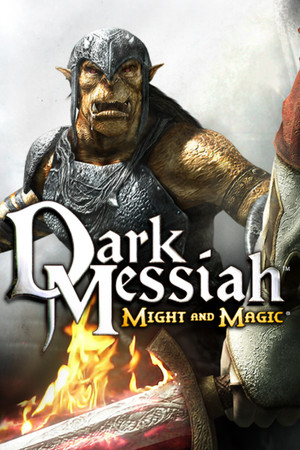
- 10,764 reviews91% positive
- Steam store page
- Released
- 2006
- Developer
- Arkane Studios
- Genre
- Action, RPG
- Time to beat
- About 10.5 hours for the main story HowLongToBeat
- Runs on
- Windows, Linux, Steam Deck
- Last checked
- October 31, 2026
Does Dark Messiah of Might & Magic run on Windows 11, Apple Silicon Macs, Linux and Steam Deck?
| Windows 11 | ✓Runs with a fix. See the steps below. Source |
|---|---|
| Mac (Apple Silicon) | ✕No Mac version is sold. |
| Linux | ✓Through Proton. ProtonDB: Gold, runs perfectly after tweaks. Source |
| Steam Deck | ✓Playable, as rated by Valve. May need some setup. Source |
Played it lately? Press Works for me or Doesn’t work on your platform, so the next player knows. One click, no account. How we check where it runs
How to get Dark Messiah of Might & Magic running today
What you need
- Required Large Address AwareLets mm.exe use more than 2 GB of memory, which fixes the out of memory crashes.
- Optional Heap emulation compatibility fixAdds a Windows compatibility entry that stops the crash when quitting the game.
- Optional Ballista-Cutscene FoV Bug FixUnlocks the field of view that the ballista cutscene in Chapter 1 locks to 80, and can raise the corpse limit.
- Optional N9 ModOptional large fix project for level, voice line, scripting and subtitle bugs that also includes the FoV fix and a higher corpse limit.
Steps
Open a step for the full walkthrough.
-
Apply Large Address Aware to mm.exe to stop out of memory crashes in demanding scenes and level loads. No mod manager is needed for any step.
- Download the Large Address Aware tool and extract it.
- Find the game folder: in Steam, right-click the game > Manage > Browse local files.
- Run the tool and open mm.exe from the game folder.
- Tick the large address aware option and save.
- Start the game and check that it loads.
-
If the game crashes when quitting, install the heap emulation fix for mm.exe.
- Download the heap emulation fix and extract it.
- Run PatchInstall.bat from the extracted folder to add the fix to the compatibility database.
- Start the game, then quit it to check that it closes cleanly.
-
If the game fails to start on Windows 10 or 11, copy the files from the bin folder into the game folder without overwriting, or start it with -autoconfig (PCGamingWiki).
- In Steam, right-click the game > Manage > Browse local files.
- Open the bin folder and copy all of its files.
- Paste them into the main game folder. When Windows asks about files that already exist, choose to skip them.
- If Lavasoft Web Companion is installed, uninstall it from Windows Settings > Apps.
- If the game still crashes with an ntdll.dll error, right-click the game in Steam > Properties > General, and type -autoconfig under Launch Options.
- Start the game. Once it runs, remove -autoconfig again so it stops resetting the settings.
-
Install the Ballista-Cutscene FoV Bug Fix so the field of view is not stuck at 80 after the Chapter 1 cyclops.
- Open the guide and download one variant: FoV fix only, or FoV fix with a higher corpse limit, each for the vanilla game or the Unlimited Edition. Choose only one.
- In Steam, right-click the game > Manage > Browse local files.
- Without the Mod Launcher, extract the variant's maps folder into the custom folder of the game folder, replacing existing files.
- With the Mod Launcher, extract the variant's top folder into the _mods folder instead, and load it after the Unlimited Edition if that variant was chosen.
- Start a new map. The fix does not apply to a map already loaded from an old save.
-
Optional: install the N9 Mod or the Restoration Mod for many more bug fixes and restored content.
- Pick one mod. The N9 Mod fixes level, voice line, scripting and subtitle bugs, and comes standalone or as a patch to the Unlimited Edition.
- The Restoration Mod restores cut content and needs the Mod Launcher and the Advanced SDK Base Module.
- Follow the install instructions on the mod's own page.
- Skip the separate FoV fix if the N9 Mod is installed, since it already includes it.
Synopsis
A first-person fantasy action game from Arkane Studios, built on Valve's Source engine and set in the Might and Magic world. As the apprentice Sareth, the player fights through linear levels using swords, bows, spells and stealth, and above all a physics-driven kick that sends enemies off ledges, onto spikes and into fires.
What people say
Reviews in 2006 split sharply: some outlets praised the physical, improvised combat and the looks, while GameSpot and others pointed to technical problems, repetitive stretches, a thin story and weak multiplayer. Players today still rate the kick-and-shove combat as some of the most satisfying in the genre. The most common complaints are crashes on modern Windows, a confusing start with poor guidance, awkward spell switching and a forgettable story.
Playability today
The average of two parts, each from 1 to 5. Tap a check to see why. How it works
Runs today
4.5 / 5- ✓Sold or given away today by an official source
- ✗Needs fan patches to run well on Windows 11
✓All of its content still works (servers, DLC, unlocks)
PCGamingWiki records no shut-down servers or lost content (PCGamingWiki).
✓Supports modern resolutions and widescreen
Native widescreen and modern resolutions (PCGamingWiki).
✓Full controller support or remappable controls
Remappable keys (PCGamingWiki).
- ✓Steam Deck Verified or Playable
- ✓No intrusive DRM or required third-party launcher account
- ✓No pay-to-win or pushy microtransactions
✓No known game-breaking bugs in the current version
PCGamingWiki lists no unresolved issues (PCGamingWiki).
1 check not confirmed yet
- Single-player works without an internet connection
From the Steam store, Valve’s Steam Deck rating and the sources under each check. Checks not confirmed yet don’t count.
Design today
3 / 5✓Controls feel natural on a modern controller or mouse and keyboard
Melee, kick and bow combat work well on mouse and keyboard. The game has no controller support, and spell switching is awkward. Source: pcgamingwiki.com.
✗Menus, text or interface are hard to read on today's screens
The HUD does not scale beyond 1080p and has positioning problems on ultrawide screens, per PCGamingWiki. Source: pcgamingwiki.com.
✓Saving is fair: free saves or frequent checkpoints, little lost progress
Saving is free and the game stores saves in its own folder, so a death costs only the time since your last save. There is no Steam Cloud sync. Source: pcgamingwiki.com.
✓It teaches itself: no guide needed to make progress
The opening level works as a guided training stretch that introduces melee, kicks, bows and spells before the real expedition begins. Source: en.wikipedia.org.
✗Pacing drags: grind, filler or forced backtracking
GameSpot's review found the gameplay repetitive, and later levels repeat the same fights and ledge kicks. Source: en.wikipedia.org.
✗Camera or movement fights the player
A cutscene early on locks the field of view to 80 for part of the game, and changing it otherwise needs console commands. PCGamingWiki lists a fix. Source: pcgamingwiki.com.
Judged against games made today, from complaints that recur among players. Each reason links to its source.
Sources
- Steam store page (requirements, platforms)
- SteamSpy (Steam review counts)
- Steam Deck compatibility, Valve
- ProtonDB reports
- Metacritic
- PCGamingWiki: Dark Messiah of Might and Magic
- VaporLens: Dark Messiah of Might & Magic
- Wikipedia: Dark Messiah of Might and Magic






How does it play for you today?